Rabu, 5 September 2018

DISCOVERING COMPUTERS - Technology in a World of Computers, Mobile devices and Internet


CHAPTER 5 - DIGITAL SAFETY AND SECURITY

Digital Security Risks

  • A digital security risk is any event or action that could cause a loss of or damage to a computer or mobile device hardware, software, data, information, or processing capability
  • Any illegal act involving the use of a computer or related devices generally is referred to as a computer crime
  • A cybercrime is an online or Internet-based illegal act

What is Hacker and Cracker?
↬Hacker is corporate spies and Cracker is unethical employees

The Difference between Hacker and Cracker


Internet and Network Attacks

  • Information transmitted over networks has a higher degree of security risk than information kept on an organization’s premise
  • Malware, short for malicious software, consists of programs that act without a user’s knowledge and deliberately alter the operations of computers and mobile devices


  • A firewall is hardware and/or software that protects a network’s resources from intrusion

Unauthorized Acess and Use

Unauthorized Acess → the use of a computer or network without permission
Unauthorized Use → the use of a computer or its data for unapproved or possibly illegal activities

  • Organizations take several measures to help prevent unauthorized access and use
    • Acceptable use policy
    • Disable file and printer sharing
  • Access controls define who can access a computer, device, or network; when they can access it; and what actions they can take while accessing it
  • The computer, device, or network should maintain an audit trail  that records in a file both successful and unsuccessful access attempts
    • User name
    • Password
    • Passphrase
    • CAPTCHA
  • A possessed object is any item that you must carry to gain access to a computer or computer facility
    • Often are used in combination with a PIN (personal identification number)
  • A biometric device authenticates a person’s identity by translating a personal characteristic into a digital code that is compared with a digital code in a computer
  • Digital forensics is the discovery, collection, and analysis of evidence found on computers and networks
  • Many areas use digital forensics;-

Software Theft
  • Software theft occurs when someone:
    • Steals software media
    • Intentionally erases programs
    • Illegally registers and/or activates a program
    • Illegally copies a program
  • A single-user license agreement typically contains the following conditions:


Information Theft
  • Information theft occurs when someone steals personal or confidential information
  • Encryption is a process of converting data that is readable by humans into encoded characters to prevent unauthorized access


  • A digital signature is an encrypted code that a person, website, or organization attaches to an electronic message to verify the identity of the sender
    • Often used to ensure that an impostor is not participating in an Internet transaction
  • A digital certificate is a notice that guarantees a user or a website is legitimate
  •  A website that uses encryption techniques to secure its data is known as a secure site
Hardware Theft, Vandalism and Failure

Hardware Theft→the act of stealing digital equipment
Hardware Vandalism→the act of defacing ot destroying digital equipment


  • To help reduce the of chances of theft, companies and schools use a variety of security measures

Backing Up – The Ultimate Safeguard
  • A backup is a duplicate of a file, program, or media that can be used if the original is lost, damaged, or destroyed
    • To back up a file means to make a copy of it

Ethics and Society
  • Computer ethics are the moral guidelines that govern the use of computers, mobile devices, and information systems
  • Information accuracy is a concern
    • Not all information on the web is correct
  • A code of conduct is a written guideline that helps determine whether a specification is ethical/unethical or allowed/not allowed
  • Green computing involves reducing the electricity and environmental waste while using computers, mobile devices, and related technologies
  • Content filtering is the process of restricting access to certain material on the Web
    • Many businesses use content filtering
  • Web filtering software restricts access to specified websites
Information Privacy
  • Information privacy refers to the right of individuals and companies to deny or restrict the collection and use of information about them
  • Huge databases store data online
  • It is important to safeguard your information


DISCOVERING COMPUTERS - Technology in a World of Computers, Mobile devices and Internet

CHAPTER 3- COMPUTERS AND MOBILE DEVICES

Computers and Mobile Devices

  • Types of computers include:
    • Desktop and mobile computers
      • A personal computer (PC) is a computer that can perform all of its input, processing, output, and storage activities by itself and is intended to be used by one person at a time
      • A mobile computer is a portable personal computer, designed so that a user easily can carry it from place to place
      • A desktop, or desktop computer, is a personal computer designed to be in a stationary location, where all of its components fit on or under a desk or table


      • A laptop, also called a notebook computer, is a thin, lightweight mobile computer with a screen in its lid and a keyboard in its base
      • A tablet is a thin, lightweight mobile computer that has a touch screen
      • A handheld computer is a computer small enough to fit in one hand


    • Servers 
      • A server is a computer dedicated to providing one or more services to other computers or devices on a network
        • Rack server
        • Blade server
        • Tower server
      • A mainframe is a large, expensive, powerful server that can handle hundreds or thousands of connected users simultaneously
    • Supercomputer
      • A supercomputer is the fastest, most powerful computer — and the most expensive
    • Servers VS Supercomputer
    • Terminal
      • A terminal is a computer, usually with limited processing power, that enables users to send data to and/or receive information from a server, or host computer
      • An ATM (automated teller machine) is a self-service banking terminal that connects to a host computer through a network
      • A self-service kiosk is a freestanding terminal that usually has a touch screen for user interaction
    • Mobile devices
      • A smartphone is an Internet-capable phone that usually also includes a calendar, an appointment book, an address book, a calculator, a notepad, games, browser, and numerous other apps
      • A digital camera is a mobile device that allows users to take photos and store the photographed images digitally
      • A portable media player, sometimes called a personal media player, is a mobile device on which you can store, organize, and play or view digital media
      • An e-book reader (short for electronic book reader), or e-reader, is a mobile device that is used primarily for reading e-books and other digital publications
    • Game devices
      • A game console is a mobile computing device designed for single-player or multiplayer video games
      • A handheld game device is a small mobile device that contains a screen, speakers, controls, and game console all in one unit
      • Game controllers include gamepads, joysticks and wheels, dance pads, and a variety of motion-sensing controllers
    • Embedded computers
    • Smartphones, digital cameras, e-book readers and portable media players

DISCOVERING COMPUTERS - Technology in a World of Computers, Mobile devices and Internet

The Internet


The Internet


The Evolution of The Internet

  • The internet originated as ARPANET in september 1969 and had two main goals:


  • With wired connections, a computer or device physically attaches via a cable or wire to a communication device.
  • Computers without a communications device can use a wireless modem.


  • A cybercafe is a location that provides computers with internet access, usually for a fee.
  • A hot spot is a wireless network that provides internet connections to mobile computers and devices.

  • An Internet service provides (ISP) is a business that provides individuals and organizations access to the internet free or for a fee. (Unifi, TM, Celcom)
  • Bandwidth represents the amount of data that travels over a network
  1. Megabyte (MB)
  2. Gigabyte (GB)
•        An IP address is a sequence of numbers that uniquely identifies each computer or device connected to the Internet
•        A domain name is a text-based name that corresponds to the IP address
•        A DNS server translates the domain name into its associated IP address


The World Wide Web


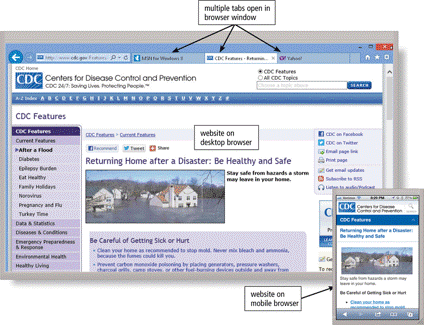
  • A browser is an application that enables users with an Internet connection to access and view webpages on a computer or mobile device
  • A home page is the first page that a website displays
  • Desktop browsers typically support tabbed browsing
•        A webpage has a unique address called a web address or URL


•        A web app is an application stored on a web server that you access through a browser. (webmail, online auction)
–       Web app hosts usually provide storage for users’ data and information on their servers, known as cloud storage


Types of Websites


•        A search engine is software that finds websites, webpages, images, videos, news, maps, and other information related to a specific topic

•        A subject directory classifies webpages in an organized set of categories, such as sports or shopping, and related subcategories


•        Search operators can help to refine your search

 •        There are thirteen types of Web sites


•        Web publishing is the development and maintenance of websites

Media on the Web


•        Multimedia refers to any application that combines text with:


•        A graphic is a digital representation of nontext information

•        Graphic formats include BMP, GIF, JPEG, PNG, and TIFF


 •        An infographic is a visual representation of data and information, designed to communicate quickly, simplify complex concepts, or present patterns or trends


•        Animation is the appearance of motion created by displaying a series of still images in sequence

•        Audio includes music, speech, or any other sound
–       Compressed to reduce file size
•        You listen to audio on your computer using a media player


      •        Video consists of images displayed in motion
•        Virtual reality (VR) is the use of computers to simulate a real or imagined environment that appears as a three-dimensional space

Other Internet Services

•        Email is the transmission of messages and files via a computer network
•        An email program allows you to create, send, receive, forward, store, print, and delete email messages


•      An email list is a group of email addresses used for mass distribution of a message


•        Instant messaging (IM) is a real-time Internet communications service


      •        A chat is a real-time typed conversation that takes place on a computer or mobile device
•        A chat room is a website or application that permits users to chat with others who are online at the same time


•        A discussion forum is an online area in which users have written discussions about a particular subject


•        VoIP (Voice over IP) enables users to speak to other users over the Internet (viber, whatapp, skype)


•        FTP (File Transfer Protocol) is an Internet standard that permits file uploading and downloading to and from other computers on the Internet

•        Many operating systems include FTP capabilities
•        An FTP server is a computer that allows users to upload and/or download files using FTP

 Netiquette


•        Netiquette is the code of acceptable Internet behavior


Microsoft Powerpoint

MICROSOFT POWERPOINT? Apa benda tu? ↪Microsoft powerpoint ni ialah program persembahan yang dibangunkan oleh microsoft untuk digunakan pa...